
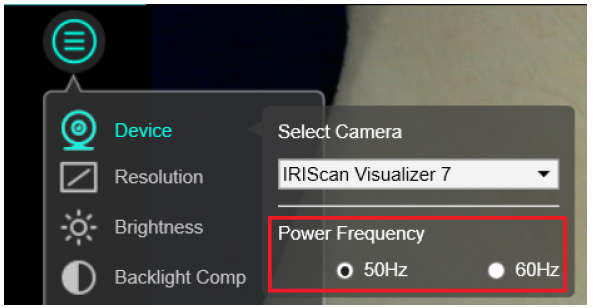
To fix this issue adjust the camera's refresh rate to 50 Hz (PAL) or 60 Hz (NTSC). The camera's default frequency should match the electrical frequency in your region.
- Go to the Image adjustment menu
- Select Device.
- Select the camera frequency: 50 Hz or 60 Hz.
| Area |
Frequency |
| France |
50 Hz |
| Germany |
50 Hz |
| Italy |
50 Hz |
| Portugal |
50 Hz |
| Spain |
50 Hz |
| United Kingdom |
50 Hz |
| Russia |
50 Hz |
| United States |
60 Hz |
| China |
50 Hz |
| Taiwan |
60 Hz |
| Japan |
50/60 Hz |
| Korea |
60 Hz |




Casey King
Comments