
Applies to:
- Readiris PDF 23 - Standard & Business
- Readiris PDF 25- Essential & Elite - Only for scans or image only input files.
Windows
- Delete the workspace folder.from the AppData folder,
- Using Windows search paste in this text and press Enter on your keyboard.
For Readiris PDF 23: %AppData%\ReadirisPDF23
For Readiris PDF 25: %AppData%\ReadirisPDF25 - Delete the Workspace folder
For example

MacOS
Delete the Workspace folder from User Library ⯈ Application Support.
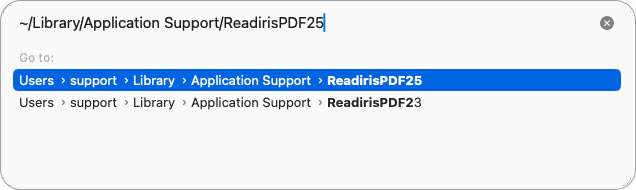
- In Finder on the desktop click on the Go menu ► Go to Folder and enter this text:
~/Library/Application Support/ReadirisPDF23
~/Library/Application Support/ReadirisPDF25 - Don't forget the tilde ~ at the beginning.
- On Ventura and above double click on the dark blue path to open the folder in Finder.
- On previous macOS versions there will be a Go button to click on.
- Delete the Workspace and Temp folders
For example




Casey King
Comments
John Smits
Same her, but then on Windows. Removed the folder, but to no avail.
John Holland
Followed your instructions, deleted the folders and Readiris 25 will still not load on my MacBook OS 26.5.1. I reported this on 06/23/26 and have had no response from support.irislink.com.