
Readiris PDF Activation and Deactivation
Activation
For retail purchases, an Activation Code will be sent to you by email along with the download link and order details.
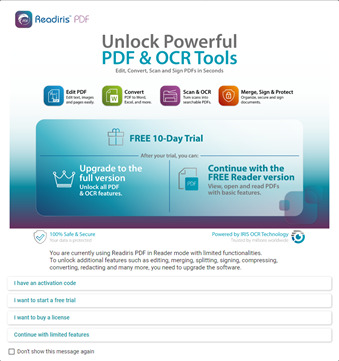
During installation, you will be prompted to activate the software:
- Select "I have an activation code".
- Copy the activation code from your email.
- Paste the code into the activation field.
- Follow the on-screen instructions to complete the activation process.
Deactivation
A Readiris PDF license can only be active on one computer at a time. If you want to use the software on a different computer, you must first deactivate the license on the currently activated device.
To deactivate the software:
- Open Readiris PDF.
- In the left navigation panel, click Activation.
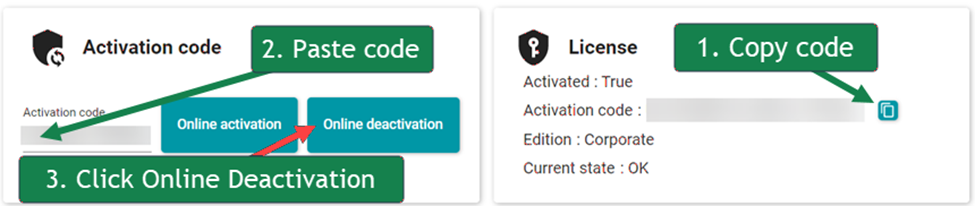
- Click Copy button to copy your activation code.
- Paste the activation code into the designated field to enable the Online Deactivation option.
- Click Online Deactivation and follow the prompts to complete the deactivation process.
Once deactivated, the activation code can be used to activate Readiris PDF on another computer.
Upgrading
If upgrading to the Elite version the only thing that needs to be done is to change the Activation Code. There is no need to download the software again.
- Deactivate the Essentials version as outlined above.
- Enter the new Activation Code and click the Online Activation button.




Casey King
Comments