
Depending on when you acquired Readiris 17 for Mac, the software uses different activation schemes. Please follow the instructions below to ensure a smooth activation on macOS.
1. Online Activation (36-Character Code – Purchased from July 2023 Onward)
Readiris 17 licenses purchased from July 2023 onward use a modern 36-character license key entered in a single field.
- Launch Readiris 17 on your Mac.
- Copy your 36-character activation code directly from your purchase confirmation email.
- Right-click (or press Cmd + V) inside the activation field and select Paste.
- Click Activate to complete online verification.
Note: An active internet connection is required during this step.
2. Manual Activation (If Online Activation Fails)
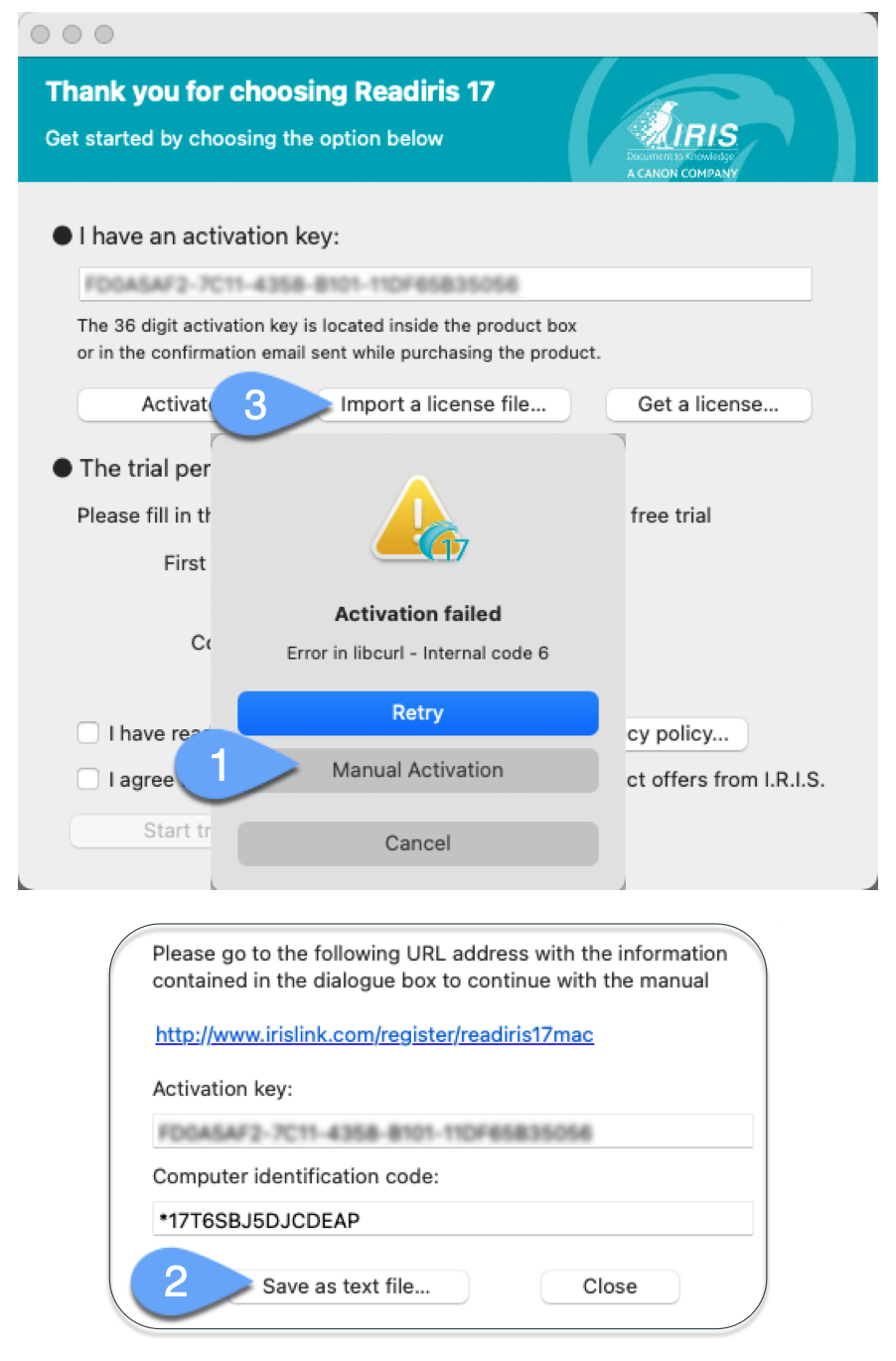
If direct communication with our activation server is blocked by a local firewall, proxy, or security software, follow these steps to generate an offline license file:
- When prompted by the activation failure dialog, click the Manual Activation button.
- Click Save as text file... and save the resulting file to your Mac.
- Attach this
.txtfile to a support ticket so our support team can assist you. - Our team will generate and return an lservrc license file.
- Restart Readiris 17, click Import a license file, and select the
lservrcfile saved on your Mac.
Important Notices: Legacy Codes & Apple Silicon Compatibility
Legacy 34-Character Codes (Purchased Before July 2023):
The legacy activation server dedicated to older Readiris 17 licenses using 34-character codes has been permanently decommissioned. These older codes can no longer be verified, reactivated, or reissued on new Mac installations.
Mac Architecture & Apple Silicon Compatibility (M1 / M2 / M3 / M4):
Readiris 17 is an Intel-based application. While it can run on modern Macs, it relies on Apple's Rosetta 2 translation environment, which can affect startup speed and OCR performance on recent versions of macOS.
For native Apple Silicon performance, faster conversion speeds, and modern 22-character key management, we strongly recommend upgrading to our current generation, Readiris PDF 27.
👉 Upgrade to Readiris PDF 27 at your exclusive customer loyalty rate




Casey King
Comments