
Sometimes, security software, proxies, firewalls, or router settings may block the software from activating automatically. If you have a current 36-digit code and need to activate manually, please provide us with the information requested in the section below by opening a support ticket.
Important Notice for Legacy Versions (34-Character Codes):
If your activation code contains exactly 34 characters (typically from purchases made between 2018 and 2022), please be advised that this legacy activation system has officially reached its end of life. To comply with modern IT security standards, the older activation servers have been permanently decommissioned. As a result, 34-character codes can no longer be activated.
To ensure you can continue working with your documents seamlessly, we offer our existing customers an exclusive loyalty discount to upgrade to our newest flagship software, Readiris PDF 27. Please contact our support team with your old code, and we will happily provide your exclusive upgrade link!
For modern versions using the 36-digit code with hyphens, please follow these steps to activate:
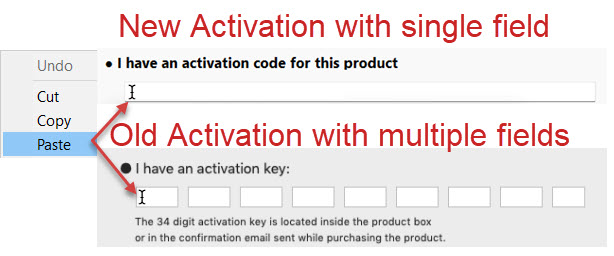
- Copy your 36-digit Serial number / Activation code (you can find this in your order confirmation email).
- Right-click inside the single activation field and select Paste so you do not have to type the entire code manually.
Click Next, and the software should activate automatically.
Note: Direct internet access is required for the software to activate automatically.
If the automatic activation fails, please send us the following information so we can generate a manual license file for you:
******************************************************************************
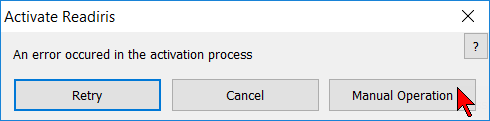
- When the activation fails, you will see a window offering three choices:
a) Retry | Cancel | Manual Operation
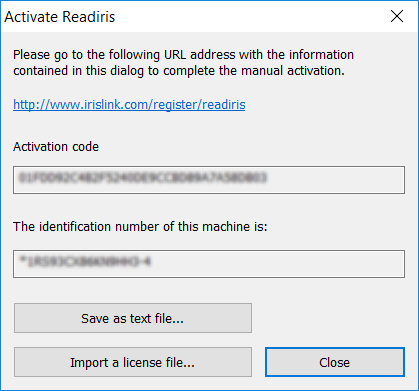
b) Click on the Manual Operation button. - Click on the Save as text file... button at the bottom of the next window, and attach that file to a support ticket.
We will use this text file to safely generate and return a manual license file to get you up and running!
******************************************************************************




Casey King
Comments